Steps in
Designing FIR Filters
1)
Setting the
Filter Specifications
2)
Setting the
Filter Frequency Specifications
a)
Window Functions Specifications
b)
Equiripple Specifications
3)
Setting the Custom Design
Specifications
a)
Auto Design

b)
Manual Design
c)
Equiripple Design
4)
Apply the Design


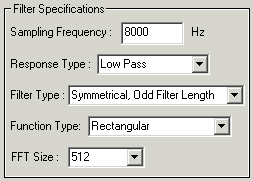
1) Setting the Filter Specifications

Enter the sampling
frequency to work with. (default
value: 8000)
Select
the required response type.

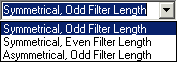
Enter
choice of filter type. (Availability
of certain filter types is related to the response type chosen)

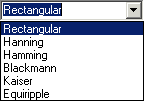
Choose
the desired function
type.

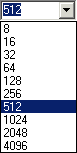
Select
the FFT length. (Not
applicable for equiripple design)


2)
Setting the Filter Frequency Specifications
a) Window
Functions Specifications
(Normal
Window Functions Design)

Key
in the 1st cutoff frequency. (eg.
1000)
The
2nd cutoff frequency will only be available depending on the type of response
chosen.
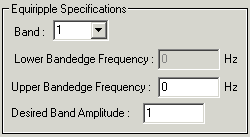
b) Equiripple Specifications
(Equiripple
Design)

Select
the band to make changes.
Set
the band edge frequency for each band.
Change
the band amplitude if required.

3) Setting the
Custom Design Specifications
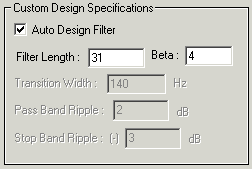
a) Auto
Design (Windows

Functions Only)

Enter
the desired filter length for the design.
Modify
the value of beta if required. (only
available for Kaiser function)
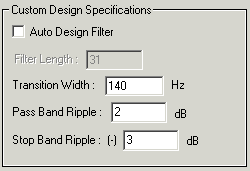
b) Manual
Design (Windows
Functions Only)

Set
the desired transition width of the filter. (only
for window functions)
Key
in the pass band ripple value. (only
available for Kaiser function)
Key
in the stop band ripple value. (only
available for Kaiser function)
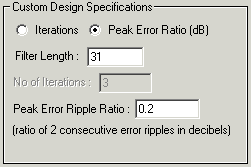
c)
Equiripple Design (Weighted
Least Squares Only)
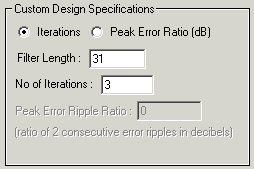
Select
design to be based on iterations or peak error ripple ratio.
Enter
number of iterations to be performed. (if
iterations selected)
Enter
peak error ripple ratio. (if
peak error ratio selected)

4)
Apply the Design

Click
the APPLY
button to design the filter.


Send mail to [email protected] with
questions or comments about this web site.
Copyright © 2002 Adrian Chin Chi Siong
Last modified: April 15, 2002
|